Built by Food Pros, for Food Pros

Discover the tools designed to simplify your workflow, improve order accuracy, and elevate your day-to-day operations.

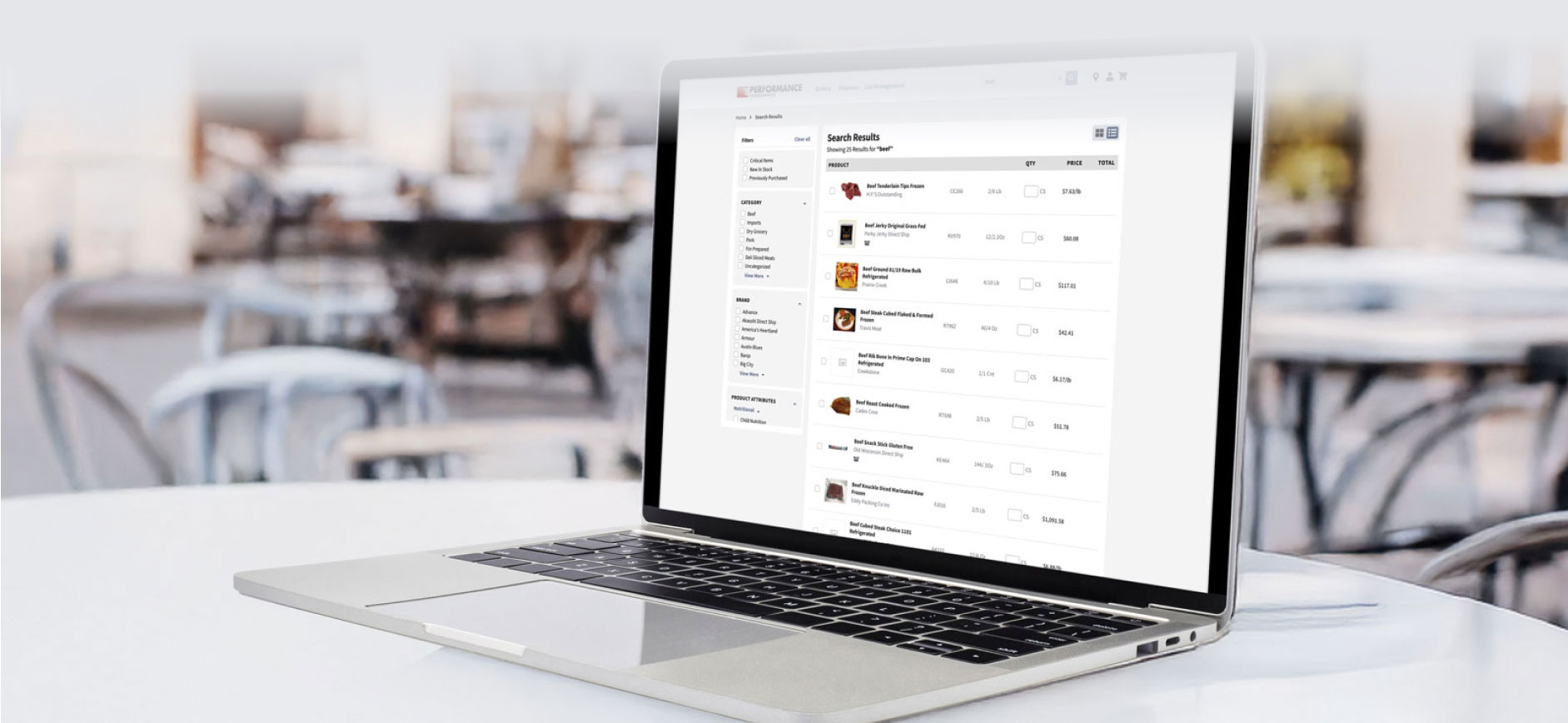
Smarter Search

Find products fast with intuitive, Google-style search, plus visuals, filters, and customer-named items for quick recall.

Flexible Ordering

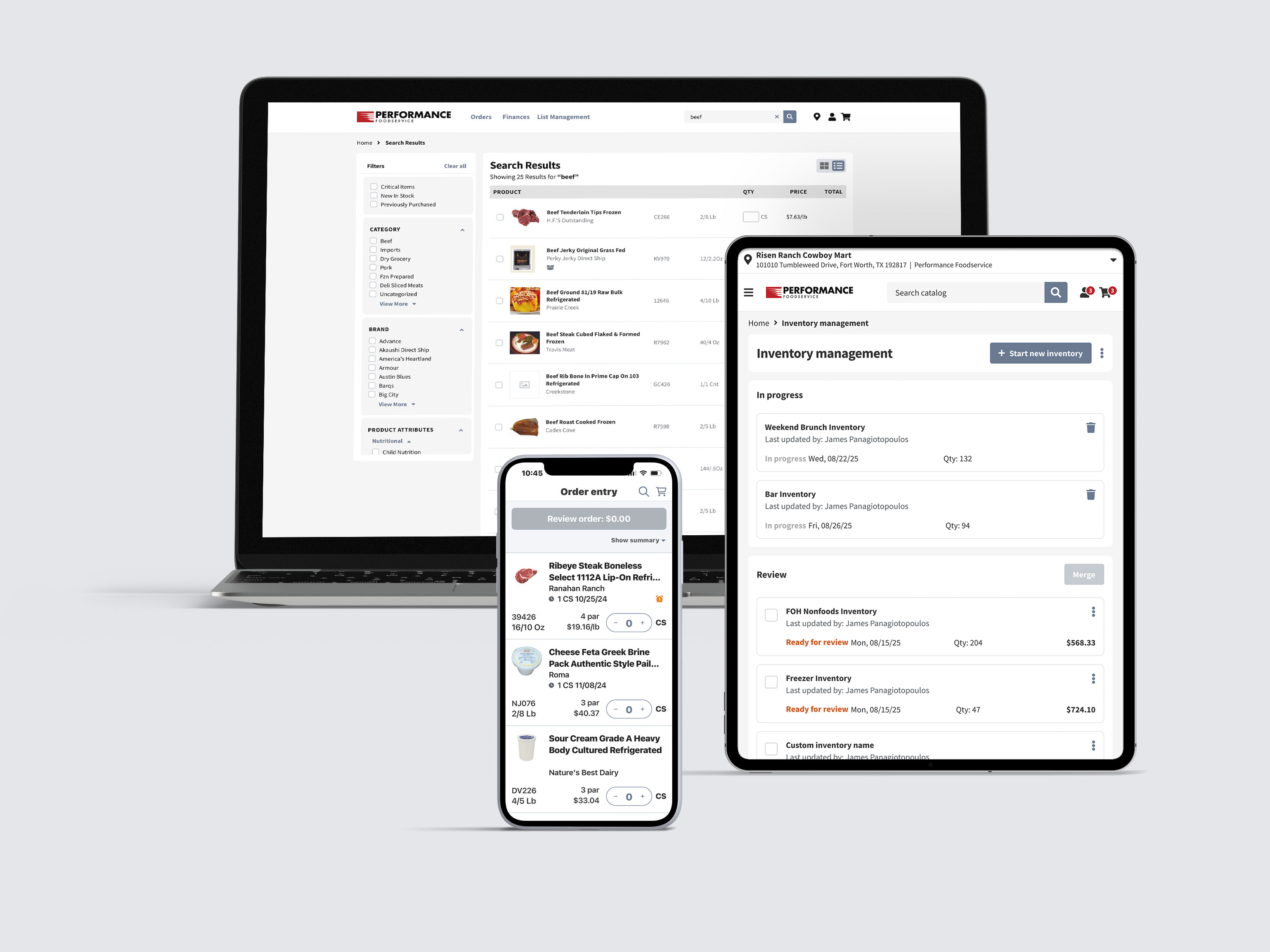
Order from desktop, tablet, or mobile - start an order on one device and finish on another. Adjust orders right up to cutoff.

Cart Icon Flexible Ordering

  • Start a new order anytime from scratch or based on past purchases.

  • Edit open orders before they’re finalized, including item changes and quantities.

  • Quickly review orders in a clear summary view before submitting.

  • Order ahead to fit your restaurant’s schedule.

  • Receive real-time order status updates from submission to delivery.

  • Search and filter past orders by date, status, PO number, and more.

  • View complete order history for up to 12 months.

  • Place repeat orders from order history or confirmation pages.

  • Replace unavailable items with the Find Similar tool.

  • Print or email confirmations for back-of-house records.

  • Manage orders across multiple locations from one account


Mobile Icon Ordering Features in Mobile

  • Smart Order Reminders: Stay on track with personalized alerts that catch forgotten items or incorrect quantities before checkout.

  • Offline Ordering: Allows users to begin and modify orders even without an internet connection. Orders sync when back online.

  • Unusual Quantity Alerts: Flags atypical order quantities based on the customer’s history and shows visual cues to prompt review, enhancing order accuracy.

  • Did You Forget? Carousel: A dynamic reminder system that prompts users with frequently ordered or critical items they might have missed — minimizing out-of-stock surprises.

  • Sticky "Review Order" Button: A mobile optimized floating button with real-time totals helps users navigate their order seamlessly, ensuring visibility and access as they scroll.

  • Swipe-Friendly Interface: Mobile allows intuitive interactions such as swiping through “Did You Forget?” items and managing product categories — enhancing speed and ease of use.

Custom Lists

Create and manage order guides tailored to your kitchen layout, par levels, or shift needs. Save time with repeat orders.

List Icon Custom Lists

  • Build and manage custom order guides tailored to specific menus, prep areas, or storage zones.

  • Tag high-priority items as critical to avoid running out.

  • Organize lists by custom categories like “Freezer,” “Dry Storage,” or 
“Daily Prep.”

  • Sort lists your way — alphabetically, by purchase history, or category.

  • Add items from anywhere (search results, product pages, or comparison views) directly into a list.

  • Replace discontinued or unavailable products with recommended or custom alternatives.

  • Copy items between multiple lists or categories to streamline list setup.

  • Edit list names and privacy settings to keep team workflows organized.

  • Tag items to retain permanently or hide outdated ones from order history.

  • Find and replace items across multiple lists at once — perfect for product switches.

  • View and search within lists to find the exact item you need fast.

  • Share saved lists with other locations you manage, ensuring consistency and speeding up ordering across your operation.

Inventory & Pars

Keep shelves stocked and costs in check. Track usage, set par levels, and streamline reordering with simple, built-in tools.
Inventory Icon Inventory & Pars

  • Take Inventory Your Way: Log and track inventory by unit, location, or product category, including PFG and non-PFG products, to maintain real-time awareness of what’s in stock.

  • Manage Third-Party Items Seamlessly: Add and organize custom vendors and products so your full inventory is captured.

  • Track Usage and Trends: Access built-in reporting to compare inventory over time, spot usage trends, and identify shrink or over-ordering.

  • Build and Manage Pars: Set ideal stock levels per item and location so your 
teams know what to keep on hand and to maintain consistency across shifts and sites.

  • Auto-Generate Orders from Inventory: Create Smart Orders based on actual on-hand inventory and your defined par levels, minimizing guesswork and ensuring you're always stocked.

  • Optimize Case vs. Each Buying: The system accounts for multiple units of measure (CS, EA, etc.) and calculates optimal purchase quantities to minimize waste and maximize value.

 Product Details Pages

  • Clear Product Insights: View all the details you need — ingredients, storage, allergens, and nutrition — at a glance.

  • Visual Confidence: See product images and labels so you know exactly what you’re ordering.

  • Smarter Ordering: Instantly add items to your cart, reorder from history, or build custom shopping lists tailored to your operation.

  • Personalized Descriptions: Rename products your way so staff can quickly find and recognize them in future orders.

  • Find the Best Fit: Use the “Find Similar” feature to discover comparable
products when something is out of stock or you want to compare options.

  • Stay Informed: View inventory levels, low-stock alerts, and banners for discontinued or special-order items — no surprises at delivery.

  • Know What You’ve Bought Before: Order history and last-purchase details help you track what’s worked for your menu.

  • Easy Access to Docs: Download safety data sheets, USDA buying guides, product formulation sheets, and more — right from the PDP.

  • Nutrition & Allergen Visibility: Quickly access nutrition facts and allergen details to keep your guests safe and your menu compliant.

  • Printable & Shareable: Generate a PDF version of the product details for staff training, back-of-house reference, or customer communication.

Download the app today

Whether you're in the office or on the go, CustomerFirst gives you full ordering power from any device. Access the platform via browser or download the native app for iOS or Android.

Visit CustomerFirstSolutions.com


Recipe & Menu Tools

Turn your pantry into profit with built-in recipe builders and menu planners that connect to your order history.

Recipe Icon Recipe & Menu Tools

  • Create, edit, copy, and delete recipes with ease.

  • Organize recipes into categories for fast access.

  • Add ingredients, sub-recipes, and preparation steps to build complete, detailed recipes.

  • Scale recipes up or down based on your needs — great for batch cooking or catering events.

  • Track food cost and profit per serving using built-in calculators.

  • Make recipes secret or hide them from shared locations to control visibility.

  • Upload images and tag recipes for better presentation and easier searching.

  • Sequence and rearrange ingredients for clear kitchen prep instructions.

  • View and restore recipe history (Diary) so nothing is lost.

  • Print or share recipes in a clean, kitchen-ready format.

  • Link ingredients to products for real-time cost tracking and availability alerts

Menus

  • Create, edit, copy, and delete menus quickly.

  • Build menus by adding existing recipes, organizing them by meal or daypart.

  • Run a cost analysis across the entire menu to manage margins and profit.

  • Create smart orders from menus to streamline purchasing based on what’s needed.

  • Filter, search, and sort menus to easily find what you need.

  • Control who sees what with options to hide menus from other locations.

  • Restore deleted menus to undo mistakes and recover previous versions.

  • Track menu changes over time with a detailed menu diary.

  • Export menu cost analysis reports for business planning, costing, or sharing with staff.

Real-Time Tracking

Track every delivery live — know exactly what's arriving, when, and what's inside.

Delivery Icon Real Time Tracking 

  • See All Today’s Deliveries: View a real-time summary of all deliveries scheduled for today — across all your locations.

  • Track Estimated Arrival Windows: Get accurate ETA windows based on delivery routes — know exactly 
when to expect each order.

  • Spot Delivery Issues at a Glance: Visual indicators show if an order is shorted or incomplete — helping you act fast.

  • Access Delivery Details: Tap into any delivery to view order number, ETA, total lines/items shipped, and dollar value.

  • Share Delivery Info with Staff: Easily forward delivery details to whoever is receiving the order — streamlining handoffs and reducing errors.

Account Management

  • Manage Multiple Locations with Ease: Instantly switch between accounts, set your working location, and place location-specific orders or view deliveries — all from one login.

  • Create and Use Custom Location Groups: Build saved groups of locations 
(like regional stores or franchises) to simplify messaging, order management, and updates across your network.

  • Send Messages to the Right Teams: Communicate with individual locations or entire groups using the built-in Message Center — complete with file sharing,
links, and high-priority alerts.

  • Track and Organize Communications: See message previews, manage replies, filter by priority, and access sent or drafted communications quickly.

  • Keep Product Lists Consistent Across Sites: Use Find & Replace tools to update items across multiple lists and notify teams instantly — ensuring every kitchen is on the same page.

Finances

  • View and download invoices and A/P statements across one or multiple 
locations.

  • Filter and search invoices by status, document type, and date range.

  • Access invoice-level details, including order date, PO #, quantity, balance, and payment history.

  • Preview and share invoices and proof-of-delivery (POD) documents in 
PDF format.

  • Export invoice data to Excel, PDF, .csv, or .txt formats — compatible with accounting tools like QuickBooks.

  • Customize exports by choosing fields like customer info, invoice totals, product details, and more.

  • Analyze purchasing trends with built-in Invoice Insights tools — generate custom or pre-built reports to:
    • Track spend by product, category, or location.
    • Compare date ranges or review trends over time.
    • Drill down into granular invoice data.

  • Save and organize insights into folders for easy access and repeat use.

Seamless Tech Integration

CustomerFirst integrates with national chain POS and ERP systems, streamlining ordering and invoicing for multi-unit operations.

Download the app today

Whether you're in the office or on the go, CustomerFirst gives you full ordering power from any device. Access the platform via browser or download the native app for iOS or Android.

Visit CustomerFirstSolutions.com

Don't Just Order - Take Control.

Get started with CustomerFirst now.

By providing this information, you give Performance Foodservice® permission to contact you. See our privacy policy for more details.
One Source Logo

Get Started with One Source Solution Partners

A restaurant has a lot of moving parts. We help keep them moving smoothly.

Sign Up for One Source